 0473 644 098 · Mon–Fri 9am–5pm AESTHelp & FAQ


NEXT STEPS: RECEIVING PAYMENTS
As Cellars.com.au integrated Stripe as our payment settlement platform, a Stripe Account is required. The only thing you need to do once your Shop on Cellars.com.au is completed is follow the steps below to set up automatic payment to your account once orders are received.
Important Note: If your Stripe Account email address is different to the email address you use to log in to https://cellars.com.au/my-account/, please let us know the email address (not password) so we can assign it to your account.
Please Note that this action can only be performed by you and there is no way for the team at Cellars.com.au as the Admin to do this on your behalf.
Step 1: Restart your computer to clear all browser sessions.
Step 2: Once you have a Stripe Account, you will need to login to your Account at https://cellars.com.au/my-account/ using the same email address.
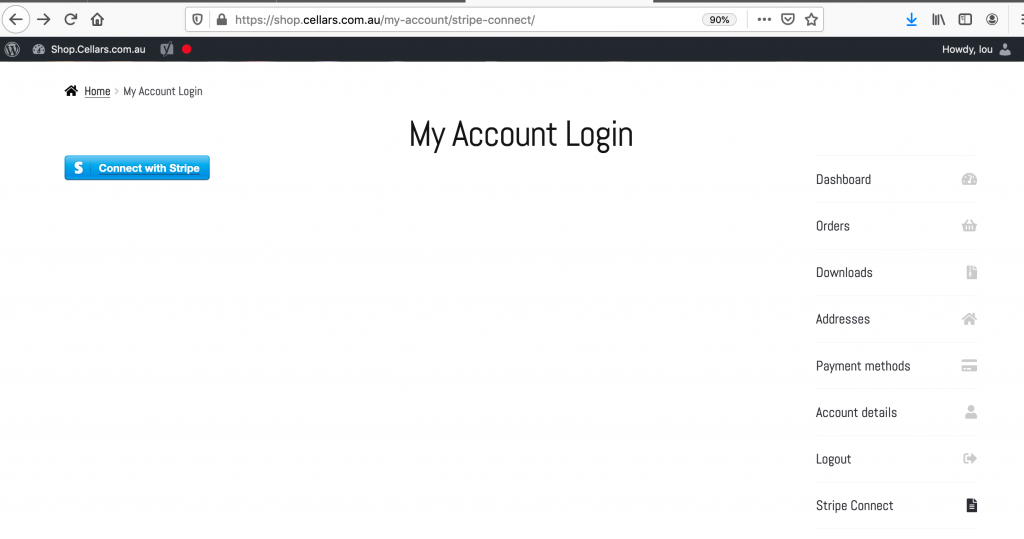
Step 3: Click on the “Stripe Connect” tab. Please see screenshot below.
Step 4: Click on the blue button Connect with Stripe.
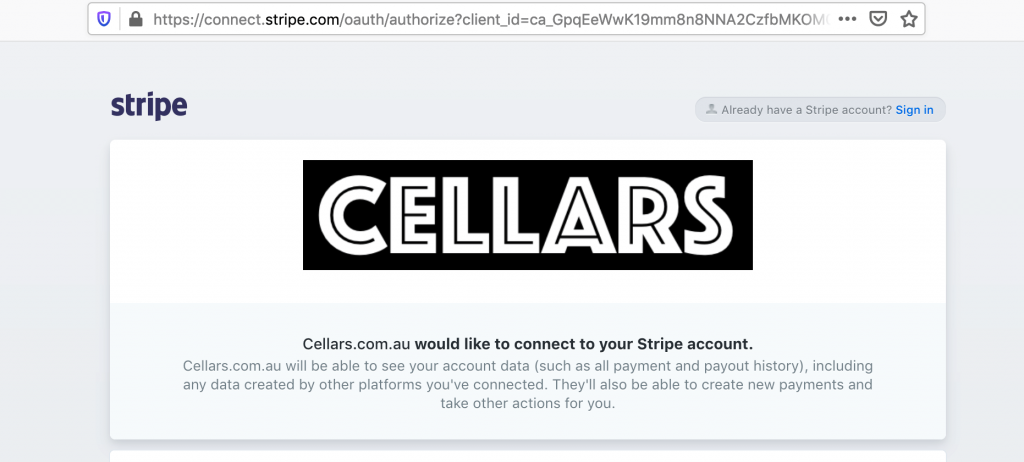
Step 5: You will see a pop up screen from the Stripe site asking you to connect to Cellars.com.au and once you have completed any further information Stripe asks for on this page, Stripe will be successfully integrated so future orders of your products will be accompanied by payment at the same time.
 Shiraz
 Cabernet Sauvignon
 Pinot Noir
 Grenache
 Merlot
 Red Wine Blends
 Chardonnay
 Riesling
 Pinot Gris
 Semillon
 Viognier
 Grenache Rosé
 Pinot Noir Rosé
 Shiraz Rosé
 Sangiovese Rosé
 Aglianico Rosé
 Clairette Rose
 Champagne
 Prosecco
 Sparkling Shiraz
 Blanc de Blanc
 Blanc de Noir
 Pet Nat
 Moscato
 Topaque
 Port
Port Sherry (dry & sweet)
 Muscat & Tokay
 Vermouth